Account and subscription
A plan sets how many new projects you can create. Everything else (uploading, editing, sharing and reviewing) works on every plan.
On this page
Plans
| Plan | Price | New projects | Support |
|---|---|---|---|
| Starter | Free | 2 a month | Help center |
| Basic | $45 a month | 35 each billing period | Email support |
| Business | $75 a month | Unlimited, for up to 5 modelers | Premium email support |
Prices include tax. Paid plans renew automatically every month. The Starter count resets on the first of each month; a paid plan’s count resets with each billing period. New Project shows how many you have left.
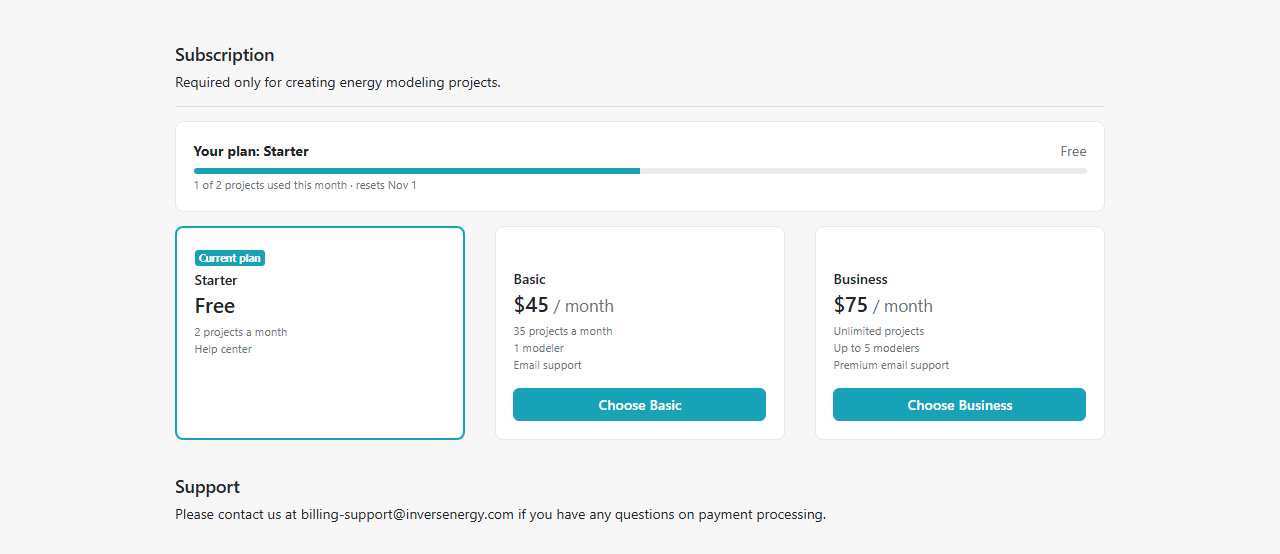
Subscribe or change your plan
Open the menu under your name (top right) and select Subscription.
- Subscribe: choose Basic or Business and enter your payment details.
- Upgrade: the new plan starts now. You pay the difference for the rest of the billing period.
- Downgrade: the change takes effect on your next billing date. You keep your current plan until then. To undo a scheduled downgrade, choose your current plan again.
- Update Payment Method: change the card used for renewals. If a payment failed, updating the card also retries it.
Modelers on a Business plan
A Business plan covers you and up to 4 other modelers. Only the plan is shared: each modeler keeps their own projects and clients.
To add a modeler, open Subscription, enter their InverseHub email under Modelers on your plan and select Add Modeler. They need an InverseHub account first; a free one is enough. If they pay for a plan of their own, they cancel it first, and you can add them once it ends. We email them when you add or remove them.
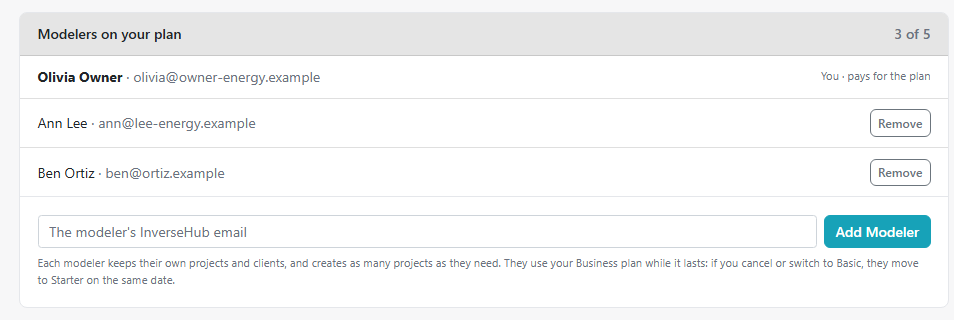
- Remove: the modeler moves to Starter at once. Their projects and clients stay theirs.
- If you cancel your plan or switch to Basic, the other modelers move to Starter on the same date.
If you’re on someone else’s Business plan, your Subscription page shows who pays for it. To choose your own plan, select Leave Plan first; you move to Starter.
Cancel
Select Cancel Subscription. Your plan stays active until the end of the period you paid for; then your account moves to Starter.
- You keep all your projects, and they stay private.
- You can still open, edit and share them, upload new results and receive comments.
- On Starter you can create 2 new projects a month.
- On Business, the other modelers on your plan move to Starter then too.
You can subscribe again at any time.
Invoices
We email you an invoice after each payment: your first payment, every renewal, and the difference charged when you upgrade. If a renewal payment doesn’t go through, we email you as well; update your payment method on the Subscription page to keep your plan.
All your payments are listed under Billing history on the Subscription page. Select View to open an invoice and print it, or PDF to download it. For questions about a payment, reply to the invoice email or write to billing-support@inversenergy.com.
Refunds
We offer a 30-day refund policy. After that, send us an explanation of your circumstances and we’ll consider your request on an individual basis. Please send all requests to billing-support@inversenergy.com.
Account settings
Open the menu under your name (top right) and select Account settings.
- Profile: your picture, your name, credential and title, and your company. Your name, credential and title appear on your PDF reports; the preview on the page shows how. A picture can be a PNG or JPG up to 2 MB; it’s cropped to a square.
- Email: your sign-in email and whether it’s verified. It can’t be changed at the moment; if you need to use a different address, email support@inversenergy.com.
- Password: enter your current password and the new one. If you’ve forgotten the current one, select Forgot your current password? to reset it by email.
- Subscription: opens the Subscription page.
- Your data: download the personal details stored in your account, or delete your account. Cancel any paid subscription first.