Show compliance
Add the calculations your compliance path needs, then let InverseHub write the conclusion. Both follow the energy code and rating system in Energy Model Information.
On this page
The two steps, on every path
- Calculations: select + on the calculations card. Its name follows the path: Performance Calculations, Energy Cost Budget Calculations, Total Building Performance Calculations or zEPI Calculations.
- Conclusion: select + on Conclusion. InverseHub checks the results against the code and writes a short pass or fail statement: the result with its numbers, then the requirement. For example: “Pass. The Performance Cost Index (PCI) is 0.42, 20.7% below the target (PCIt) of 0.53. It must be at most the PCIt.” When the design passes, it adds the compliance statement, for example: “The building performance meets the minimum performance required by the Performance Rating Method of ASHRAE Standard 90.1-2019.”
To redo either, delete it with its trash icon and add it again; the saved text doesn’t update by itself. Change the inputs with the edit icon on the calculation.
The review page’s summary shows the conclusion’s key figures, such as LEED points, the PCI against the PCIt or the 179D deduction. They’re saved when you add the conclusion, and editing its text keeps them. For a conclusion added before October 23, 2026, the summary works them out from the results.
A conclusion that uses conversion factors or ratios ends with a small gray line listing the ones it used, for the fuels in your results. These include GHG emission factors, source-to-site ratios and a code’s own source energy or carbon factors. A conclusion added before October 25, 2026 shows the line once you add it again or refresh it.
When you change an input the conclusion uses, InverseHub checks whether its figures move. Saving a new eGRID subregion, other General Information such as the country or areas, or the zEPI calculations then shows Conclusion out of date with each figure that changes. The Conclusion card also shows a reminder until the conclusion is updated. Refresh deletes the conclusion and adds it again from the current inputs. Edits you made to its text are lost; reviewers’ comments are kept.
Performance Rating Method (ASHRAE 90.1 Appendix G)
90.1-2016 and later, and the codes built on them
Compliance is a performance cost index (PCI) at or below its target (PCIt). The target comes from the code’s building performance factors (BPFs).
- On Performance Calculations, select +.
- Choose the Performance Index Calculation Method:
- Performance Cost Index Method: energy cost, as the standard requires.
- Performance Energy Index Method: site energy. Codes with their own energy rules name their method here instead. For example, NYC 2020 uses source energy, NYC 2025 site energy, and ASHRAE 90.1-2022 and Oregon 2025 let you pick site energy, source energy or carbon, optionally with local conversion factors.
- Choose the BPF Calculation: the code’s defaults for your climate zone, or a Custom BPF.
- Enter the floor area of each Building Area Type. The effective BPF is the area-weighted average. BPFs cover conditioned floor area only.
- For 90.1-2022 and the codes based on it, enter the annual output of any on-site solar the code requires. Its value comes off the target, and only renewables beyond it count toward the 5% renewables credit.
- Select Add Calculations.
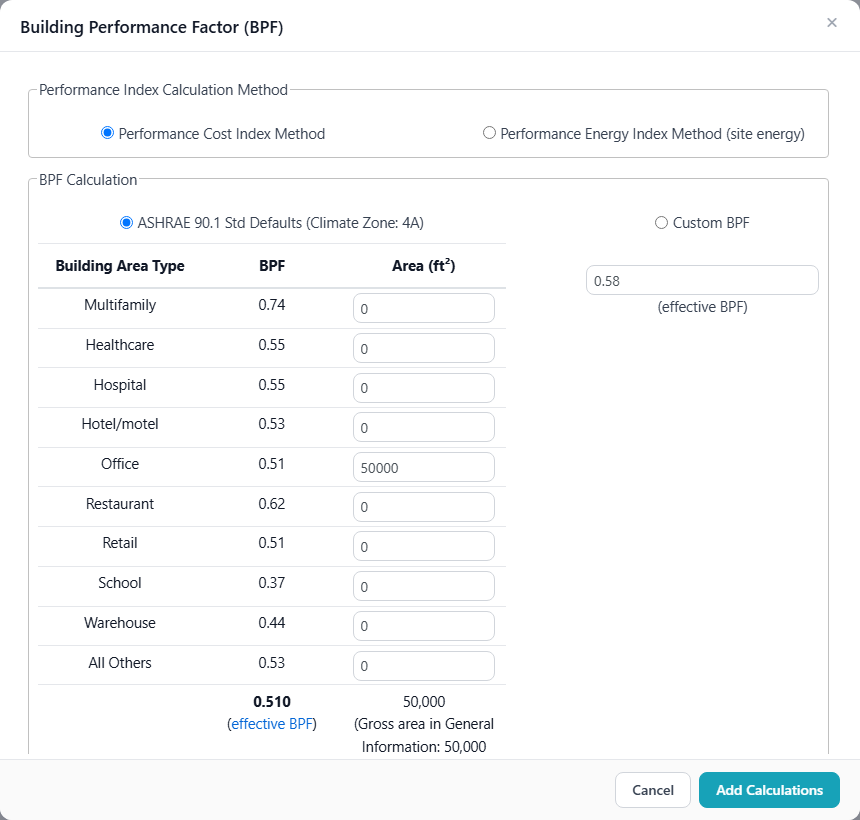
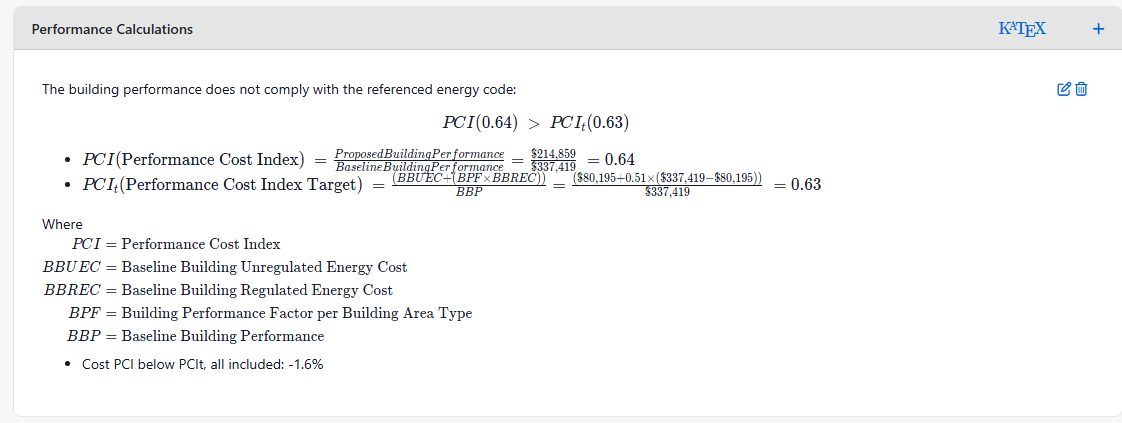
The card then shows the result with each step of the calculation.
If you pick a method the code doesn’t allow, a red note says so in the dialog, the calculation and the conclusion. The conclusion then leaves out the compliance sentence: the result is for reference only.
90.1-2007, 2010 and 2013
There are no BPFs. The conclusion compares the proposed design’s energy cost with the baseline’s: it passes when the proposed cost is lower. With the energy method, it compares site energy instead.
Energy Cost Budget Method (ASHRAE 90.1)
Compliance is the design energy cost (the proposed design’s) at or below the energy cost budget (the budget building’s).
- On Energy Cost Budget Calculations, select +. For 90.1-2022 and the codes based on it, enter the energy credits required, the additions and alterations factor and the annual output of the required on-site solar. Earlier editions need no inputs here.
- Add the conclusion.
On-site renewables are subtracted from the design energy cost. From 90.1-2016 on, they’re credited up to 5% of the budget.
Requirements the edition sets beyond the cost comparison are listed in the calculation as “also required, not checked here”.
Total Building Performance (IECC)
Compliance is the proposed design’s annual energy cost at or below a share of the standard reference design’s:
| Code | Limit | On-site renewables |
|---|---|---|
| IECC 2006, 2009 | 100% | Subtracted from the proposed cost |
| IECC 2012, 2015 | 85% | Subtracted from the proposed cost |
| IECC 2018, 2021 | 85% | Credited up to 5% of the reference design’s cost |
| Chicago 2022 | 80% | Credited up to 5% |
| New York State 2020 | 85% | Subtracted from the proposed cost |
Add Total Building Performance Calculations (+), then the conclusion.
IgCC Performance Option
- On zEPI Calculations, select +. Choose your project’s EPA eGRID subregion: it sets the electricity’s source energy and carbon factors. For IgCC 2021, also enter the building areas.
- Add the conclusion. InverseHub checks the zero energy performance index (zEPI) against its target and the carbon (CO₂e) emissions.
InverseHub can’t conclude for IgCC 2018 yet, because its tables from ASHRAE 189.1-2017 are still to be entered.
LEED and other programs
For LEED rating systems, the conclusion gives the points for the Optimize Energy Performance credit under the LEED version you chose. The Massachusetts paths (below) and 179D have their own conclusions too.
For NGBS with IECC 2018, the 2020 NGBS baseline, the conclusion gives the Energy Efficiency points and level. The points are 30 plus 2 for each percent of energy cost savings over the IECC standard reference design, rounded down: Bronze at 30 points (meets the IECC), Silver at 45 (7.5%), Gold at 60 (15%) and Emerald at 70 (20%). With other IECC editions, the conclusion compares the energy cost with the baseline.
On the 2024 Update, the points add up two metrics: the higher of energy cost savings and source energy savings, and the GHG emissions reduction. InverseHub works out source energy with both sets of source-to-site ratios the LEED calculator accepts, ASHRAE 90.1-2022’s and ENERGY STAR Portfolio Manager’s, and uses the set with the higher savings. The line under the points names it, with the other set’s result, and lists the ratios and GHG factors used. Canadian projects use Portfolio Manager’s ratios for Canada and their province’s or territory’s GHG factors, chosen under General Information. The ratios, emission factors and what’s subtracted are in How results are calculated.
LEED v4.1 and the LEED v4 pilot credit (ACP 110) also score GHG emissions. Their electricity uses the same factors: the eGRID subregion, or a Canadian project’s province or territory, chosen under General Information.
For LEED ID+C on the 2024 Update, adding the conclusion first asks which baseline envelope you modeled: New construction or Existing conditions before renovation. The conclusion and the review page’s summary then give the points for that envelope only. To switch, delete the conclusion and add it again.
On the 2024 Update, new off-site renewable energy entered in SimReader counts toward the GHG emissions reduction only, not toward energy cost or source energy. Each system’s emissions offset uses its grid region’s eGRID factor. The conclusion says how much of the reduction it gives. The project page shows each system’s offset and, for your Renewable Energy credit, its share of the proposed design’s site energy and GHG emissions before renewables. InverseHub doesn’t calculate the Renewable Energy credit’s points.
Massachusetts
| Path | What the conclusion checks |
|---|---|
| MA Energy Code 2020, Pathway 1a | ASHRAE 90.1-2016 Appendix G: the PCI at most the PCIt. Select a BPF under Performance Calculations first. |
| MA Energy Code 2020, Pathway 1b | The stretch code’s large buildings: energy use at least 10% below the ASHRAE 90.1-2013 Appendix G baseline, on a site or a source energy basis. The conclusion gives both and passes on either. Source energy uses the code’s factors: electricity 2.80, natural gas 1.05, fuel oil and propane 1.01, district heating 1.20, district cooling 0.91, other fuels 1.1, on-site solar or wind 1.00. |
| MA Energy Code 2021, Relative Performance | ASHRAE 90.1-2019 Appendix G on site energy: the PEI at most the PEIt, with the code’s BPFs. On-site renewable energy isn’t subtracted from the proposed design’s site energy. Select a BPF first. |
| MA Energy Code 2021, Targeted Performance | Each use type’s heating and cooling TEDI (thermal energy demand intensity) at most the code’s limits for its use type and size. |
For Targeted Performance, adding the conclusion asks for each use type’s area and heating and cooling TEDI (kBtu/ft² a year) from your model, following DOER’s simulation guidelines, and shows each limit as you type. Add a row for each use type over 10% of the conditioned area; each is checked on its own. InverseHub keeps the entries for the phase and fills them in next time. This path doesn’t use Performance Calculations.
Living Building Challenge, Zero Carbon and Zero Energy
Choose Living Building Challenge, ILFI Zero Carbon or ILFI Zero Energy as the rating system. When you add the conclusion, InverseHub asks what kind of project it is (New building, Renovation or Interior) and for a typical building’s site EUI from ENERGY STAR Target Finder or another ILFI-approved tool. It keeps both for the phase and fills them in next time.
| Certification | What the conclusion checks |
|---|---|
| ILFI Zero Carbon | A new building: at least 20% better than the energy code without renewables (ASHRAE 90.1-2019 or later, or IECC 2021 or later). A renovation or interior: meets the code, or a site EUI at least 50% below the typical building’s. New on-site and off-site renewables covering 100% of the operational energy. No combustion in a new building. |
| ILFI Zero Energy | On-site renewables covering 100% of the energy use, net annual. No combustion. The site EUI is shown for comparison. |
| Living Building Challenge | A site EUI after on-site renewables at least 70% (new building), 50% (renovation) or 35% (interior) below the typical building’s. New on-site and off-site renewables covering 100% of the operational energy. On-site renewables covering 105% for Net Positive Carbon. |
For a new building under Zero Carbon, the improvement follows the index you picked in Performance Calculations, so select a BPF there first.
The renewable energy lines list the capacity, the production required and the production provided, in kWh. What the results don’t hold appears in brackets, such as [__ kW] for a system without a rated capacity and [location] for each array. Edit the conclusion to fill them in.
ILFI certifies on 12 months of measured performance and also reviews embodied carbon, metering and more. The conclusion shows whether the design is on track; it doesn’t check those.
Unmet load hours
When the upload includes unmet load hours, an Unmet Load Hours card shows them for both designs. It’s hidden until you switch it on, both on the review page and in the PDF.
Next: Share and handle comments · How results are calculated