Fill in Energy Model Inputs
Tell InverseHub which energy code and compliance path the project follows. It can then fill the baseline column of your model inputs from that code.
On this page
Energy Model Information
Select Edit on the card, change what you need, then Save.
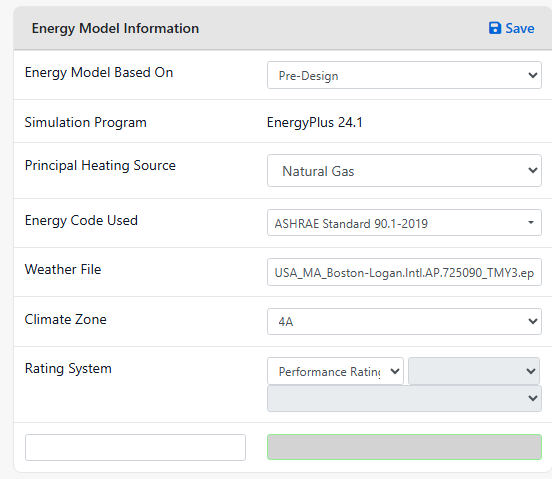
| Field | What to enter |
|---|---|
| Energy Model Based On | The design stage the model reflects. |
| Simulation Program, Weather File | Filled in by the SimReader upload. |
| Principal Heating Source | The proposed design’s main heating fuel. Fill Baseline uses it to pre-select HVAC systems. |
| Energy Code Used | Type to search. Codes for your project’s state are listed first. The (i) next to the code summarizes what InverseHub does for it. |
| Climate Zone | Used for the baseline tables and the building performance factors. |
| Rating System | Only the compliance paths of the code you chose are offered, plus certifications and programs such as LEED, NGBS or 179D. |
The compliance paths by code:
- ASHRAE 90.1, and the state and city codes built on it: Performance Rating Method (Appendix G) and Energy Cost Budget Method.
- IECC: Total Building Performance. To use the ASHRAE 90.1 alternative an IECC edition allows, pick that 90.1 edition as the energy code instead.
- IgCC: its Performance Option.
- Codes that combine both, such as Chicago 2022 and New York State: all of their paths.
The full list is in Energy codes and compliance paths.
Energy Model Inputs
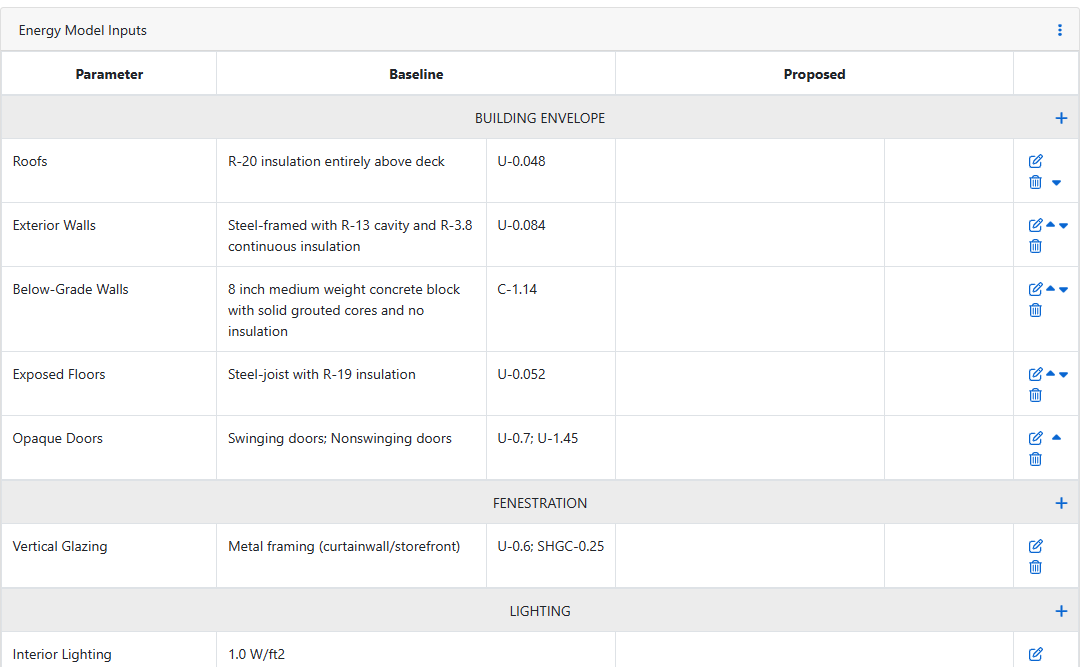
Each row has a Baseline and a Proposed column, by section: building envelope, fenestration, lighting, process loads, HVAC and domestic hot water. Use + on a section to add a row, and Edit to change one.
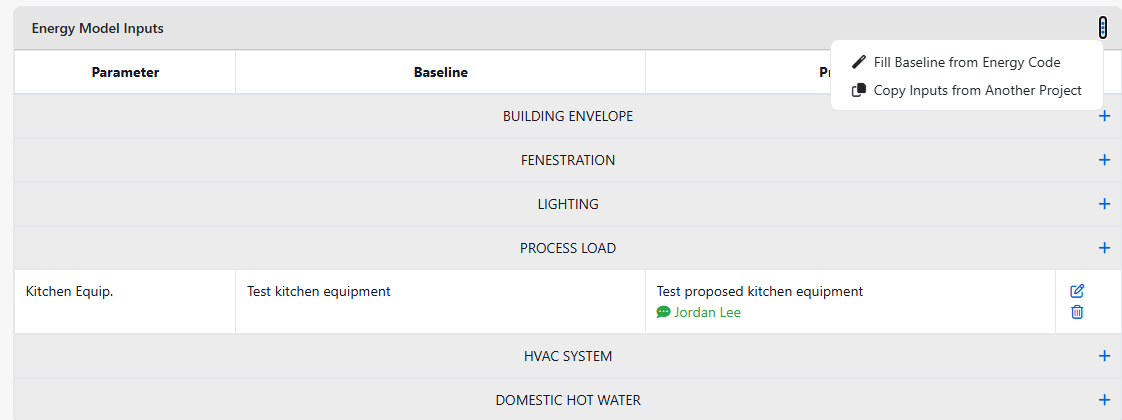
Fill the baseline from the energy code
In Energy Model Inputs, open the menu (⋮) and select Fill Baseline from Energy Code. The name follows the path: Fill Budget Building… for the Energy Cost Budget Method, Fill Standard Reference Design… for Total Building Performance.
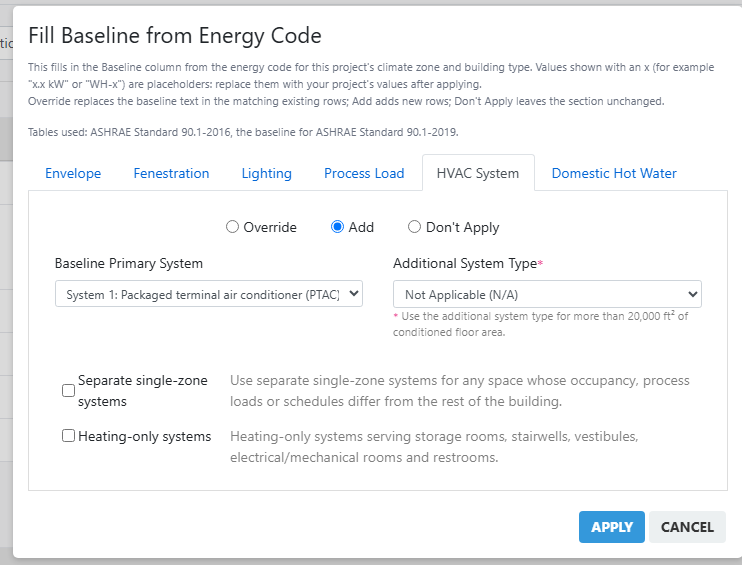
- The note at the top names the tables used. On each tab choose Add, Override or Don’t Apply, and tick the items to fill.
- Select Apply, then check the filled-in values.
Values with an x (for example “x.xx EER” or “U-0.XX”) are placeholders. Replace them with your project’s values. When a code changes some baseline rules, the dialog asks you to check the values against the code’s text.
Fill Baseline writes text into the Baseline column only. It doesn’t change your energy model or your uploaded results.
What gets filled, by compliance path
| Path | Envelope, fenestration, lighting | HVAC |
|---|---|---|
| Performance Rating Method | The Appendix G baseline tables of the code’s 90.1 edition. From 90.1-2016 on, the baseline is the same in every edition, so the 90.1-2016 tables are used. | You choose the baseline system and any additional system types and exceptions. |
| Energy Cost Budget Method | The budget building tables: 90.1-2016’s own tables; 90.1-2010 and 2013 use the edition’s tables. For 90.1-2019 and 2022 these aren’t in InverseHub yet, so these sections are left for you. | The budget system, pre-selected from your proposed design (see below). Efficiencies are placeholders. |
| Total Building Performance (IECC) | The IECC’s standard reference design: 2009 to 2021. IECC 2006 isn’t available yet. | The reference system, pre-selected from your proposed design (see below). |
Process loads and domestic hot water are filled the same way on every path.
HVAC systems pre-selected from the proposed design
For Total Building Performance and the Energy Cost Budget Method, the code assigns the baseline HVAC system from three facts about your proposed design. The HVAC System tab asks for them and pre-selects the system. You can still pick another.
| Condenser cooling source | Heating system | Single-zone, residential | Single-zone, other | All other systems |
|---|---|---|---|---|
| Water or ground | Electric resistance | 5 | 5 | 1 |
| Water or ground | Heat pump | 6 | 6 | 6 |
| Water or ground | Fossil fuel | 7 | 7 | 2 |
| Air or none | Electric resistance | 8 | 9 | 3 |
| Air or none | Heat pump | 8 | 9 | 3 |
| Air or none | Fossil fuel | 10 | 11 | 4 |
Systems: 1 VAV with parallel fan-powered boxes · 2 VAV with reheat · 3 Packaged VAV with parallel fan-powered boxes · 4 Packaged VAV with reheat · 5 Two-pipe fan coil · 6 Water-source heat pump · 7 Four-pipe fan coil · 8 Packaged terminal heat pump · 9 Packaged rooftop heat pump · 10 Packaged terminal air conditioner · 11 Packaged rooftop air conditioner.
For the Performance Rating Method, the Appendix G baseline system depends on more than this (building type, size and floors), so you choose it yourself.
Next: Show compliance